YouYoung Seo
Large language models can reason about almost anything. The problem is getting from reasoning to action in a real operating environment.
Opening SAP, filling in an ERP screen, navigating a digital cockpit after a CAN signal fires. All of these require concrete interaction with a running system. Until recently, that meant hard-coded scripts tied to DOM selectors, XPaths, or proprietary APIs. In environments like HIL/SIL test benches where none of those exist, it meant an engineer sitting in front of a screen doing it manually.
AskUI was built to close this gap. It gives AI agents the ability to see any screen and act on it without requiring access to the application's internal code. And through Tools, it extends that into the full test environment: reading test cases from files, calling external simulation APIs, waiting for hardware states to settle, and writing reports to disk.
Most computer use agents look impressive in demos but break under real enterprise constraints, no DOM access, locked-down builds, physical test benches. AskUI is built for that environment. For a deeper look at the full architectural picture, see 3-Layer Architecture for Enterprise AI Agents.
1. The Core Concept: Functional Testing Using AI Agents
Traditional automation tools (Selenium, Appium) rely on the application's internal code structure: DOM, accessibility trees, XPath selectors. In embedded systems, automotive digital clusters, and industrial HMI panels, none of these exist. The tools simply cannot operate.
Consider the difference:
# The Old Way (Brittle)
# Breaks if the developer changes the ID. Doesn't work without DOM access.
driver.find_element(By.XPATH, "/html/body/div[2]/form/button").click()

# The AskUI Way
# Single action, identify the element on screen and interact directly.
agent.click("Sign In")

# Or goal-based, give a high-level instruction and let the agent figure out the steps.
agent.act("Log in using the credentials in the test_cases.csv file")
AskUI agents perceive the screen the same way a human engineer does: by looking at it. They identify UI elements and verify whether the system is behaving correctly. The agent sees. The goal is functional testing.
This is what allows AskUI to operate on locked-down production builds, QNX-based HMI panels, WinCC SCADA screens, and automotive digital clusters. Environments where instrumentation hooks don't exist and screen access is the only access.
2. Architecture: Separating Reasoning from Execution
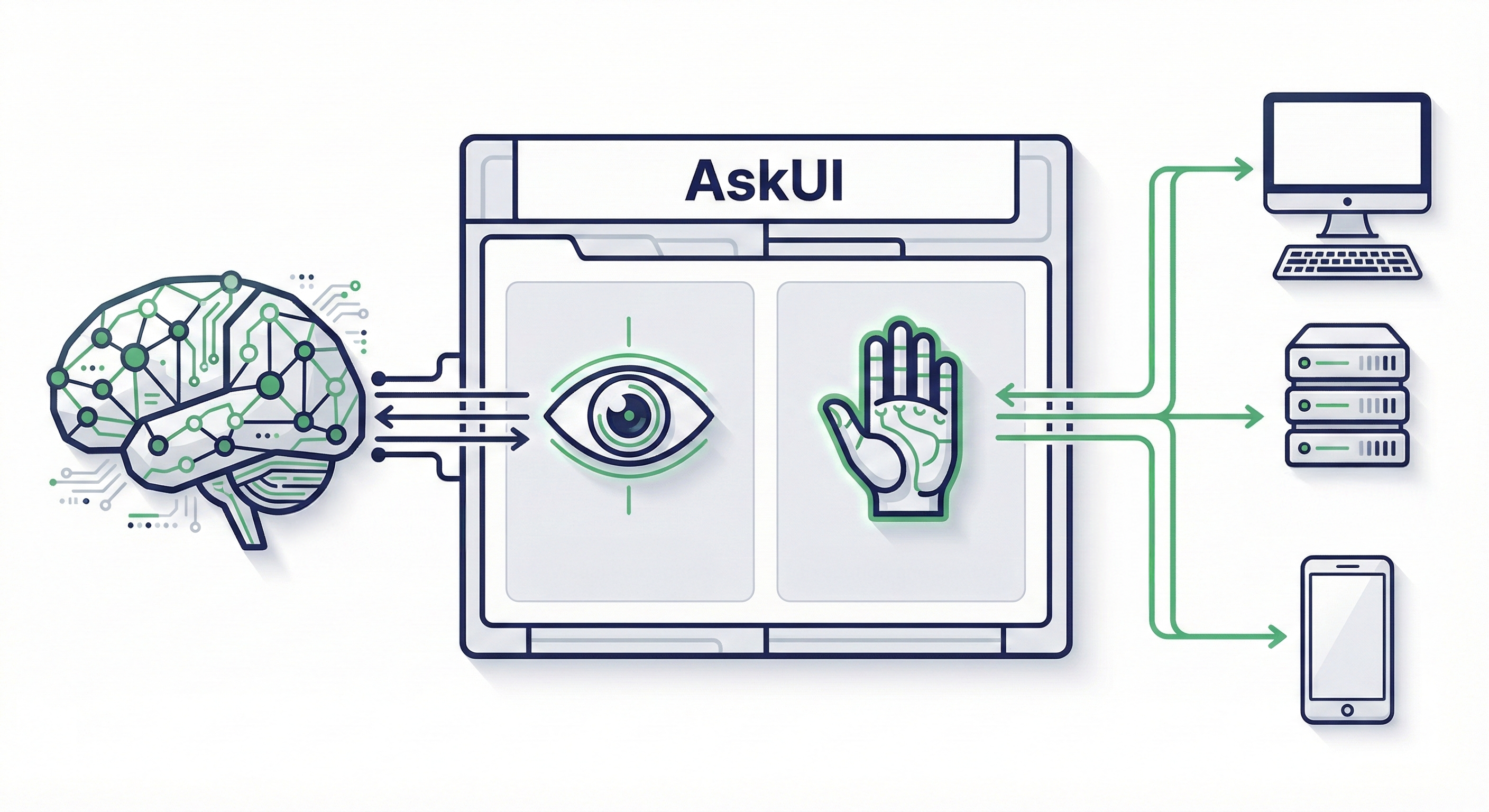
AskUI separates two distinct responsibilities: deciding what to do (the reasoning layer) and actually doing it (the execution layer).
The AI Agent is the Python-based reasoning engine. It receives a high-level goal, analyzes the current screen state, and determines what to do next. It doesn't follow a rigid script. It reasons about what's visible and plans accordingly.
from askui import ComputerAgent

with ComputerAgent() as agent:
    agent.act("Open the CRM and find the latest invoice.")
Agent OS is a lightweight runtime installed on the target device. It handles OS-level execution: mouse movement, keyboard input, touch gestures, screenshot capture. When structured signals like DOM or selectors are available, AskUI leverages them for speed. When they are not, such as on embedded displays, locked-down builds, or HIL test benches, it falls back to screen-based execution with native input control. Because it runs locally on the device, execution latency is measured in milliseconds. The bottleneck is always the reasoning step, not the physical interaction.
This separation matters for scale. The reasoning layer can be updated independently of the execution layer, and Agent OS runs on Windows, macOS, Linux, Android, and iOS without the reasoning layer needing to know the difference.
OSWorld Benchmark: On the OSWorld benchmark, AskUI Vision Agent achieves a state-of-the-art score of 66.2 on multimodal computer-use tasks.
3. Tools: Extending What the Agent Can Do
Perceiving the screen and interacting with it covers a lot. But real-world testing requires more. Reading test cases from a CSV, calling an external simulation API to trigger a signal, waiting for the display to update, saving screenshots, writing reports to disk.
Without a way to handle these operations, the agent can see and click, but it can't participate in a complete test workflow. That's what Tools are for.
A Tool is a capability you give to an agent. AskUI ships with a built-in Tool Store covering common operations:
Universal Tools work with any agent type:
| Tool | What it does |
|---|---|
| ReadFromFileTool | Reads content from files (supports multiple encodings) |
| WriteToFileTool | Writes content to files |
| ListFilesTool | Lists files in a directory |
| PrintToConsoleTool | Prints messages to console during execution |
| LoadImageTool | Loads images for analysis or comparison |
| GetCurrentTimeTool | Returns current date/time for time-aware decisions |
| WaitTool | Pauses execution for a specified duration |
| WaitWithProgressTool | Waits with a visual progress bar |
| WaitUntilConditionTool | Polls a condition with configurable interval and timeout |
Computer Tools require Agent OS (desktop environments):
| Tool | What it does |
|---|---|
| ComputerSaveScreenshotTool | Captures and saves screenshots to disk |
| Window management tools | List processes, focus windows, manage virtual displays |
Tools are registered when the agent is created:
from askui import ComputerAgent
from askui.tools.store.universal import PrintToConsoleTool, WriteToFileTool
from askui.tools.store.computer import ComputerSaveScreenshotTool

with ComputerAgent(act_tools=[
    PrintToConsoleTool(),
    WriteToFileTool(base_dir="./reports"),
    ComputerSaveScreenshotTool(base_dir="./screenshots"),
]) as agent:
    agent.act("Take a screenshot and save it, then print a status message")
The agent doesn't follow a hard-coded sequence. It reads the goal, sees what Tools are available, and decides which ones to call and in what order.
For a full breakdown of every Tool in the store and how to choose between them, see What Are Tools in Agentic Testing.
4. Custom Tools: Integrating with External Systems
Built-in Tools handle file I/O and screenshots. For hardware validation, you often need more: a Tool that talks to a simulation system, triggers a signal, or interfaces with hardware your tests depend on.
Write a Tool class in helpers/tools/, register it in helpers/get_tools.py, and define your tests in a CSV. The main.py orchestrator handles everything else. You never touch it directly, and you never write agent.act() calls yourself.
Here's a Tool that wraps an external HVAC simulation API:
# helpers/tools/hvac_tool.py
from askui.models.shared.tools import Tool

class HvacTool(Tool):
    """Wraps the external HVAC simulation API (e.g., CANoe, dSPACE)"""

    def __init__(self):
        super().__init__(
            name="hvac_tool",
            description="Sets the HVAC temperature via the external simulation system",
            input_schema={
                "type": "object",
                "properties": {
                    "temperature": {
                        "type": "number",
                        "description": "Target temperature in °C"
                    }
                },
                "required": ["temperature"]
            }
        )

    def __call__(self, temperature: float) -> str:
        # Engineer implements the connection to their simulation API here
        # e.g., canoe_client.set_signal("HVAC_Temp", temperature)
        return f"HVAC set to {temperature}°C"
Register it in helpers/get_tools.py:
from askui.models.shared.tools import Tool
from .tools.hvac_tool import HvacTool

def get_agent_tools() -> list[Tool]:
    return [HvacTool()]
Define test cases in a CSV:
Test case ID, Test case name, Step description, Expected result
TC-001, HVAC 22°C, Set HVAC to 22°C and verify display, Climate control shows 22°C on digital cluster
TC-002, HVAC 18°C, Set HVAC to 18°C and verify display, Climate control shows 18°C on digital cluster
Then run:
python main.py tests/hvac_tests/The orchestrator reads the CSV, passes the registered Tools to the agent, and the agent decides when to call HvacTool based on the test intent. For a test case that says "Set HVAC to 22°C and verify the climate display," the agent calls HvacTool to send the signal, waits for the display to update, verifies the screen output, and writes a report. All in one agentic flow.
This is what makes it agentic rather than scripted. The sequence isn't predetermined. The agent plans it based on the goal and the available Tools. The engineer writes the Tool once. The test cases drive everything else.
For a full walkthrough of how Tools, CSV test cases, and the agent work together in a complete test run, see How AskUI Orchestrates a Test Run.
5. Latency Architecture: Reasoning vs. Execution
A common concern about agentic AI is speed. AskUI addresses this by separating decision latency from execution latency.
The bottleneck: AI inference (>500ms). For the agent to see and decide, time is consumed: screenshot capture, upload, token processing. This is the necessary cost of reasoning.
The optimization: native execution (milliseconds). Once the decision is made, Agent OS processes it locally on the device, typically within a few milliseconds. The physical interaction is never the bottleneck.
For high-frequency regression testing, AskUI's caching layer takes this further. It records successful test trajectories and replays them on subsequent runs without calling the LLM again. The first run costs inference tokens. Repeat runs replay the cached path at near-zero cost.
from askui import ComputerAgent
from askui.models.shared.settings import CachingSettings, CacheWritingSettings

with ComputerAgent() as agent:
    agent.act(
        goal="Login with user 'admin' and password 'secret'",
        caching_settings=CachingSettings(
            strategy="auto",
            writing_settings=CacheWritingSettings(
                filename="login_flow.json"
            ),
        )
    )
This is what makes continuous regression testing across multiple hardware variants viable. Without caching, every run costs full LLM inference. With it, repeat runs are fast enough for high-frequency test cycles.
6. Enterprise Readiness: Observability, Safety, and Standards
Audit logging captures every action the agent performs: what it saw, what it decided, what it did, and what the result was. AskUI's SimpleHtmlReporter generates structured HTML reports for each run, including screenshots at every step. Every agent action becomes a traceable operational event. In regulated industries, this is the difference between "we tested it" and "we can prove we tested it."
Safety guardrails can be implemented directly in code, intercepting and blocking risky commands before they reach the agent:
from askui import ComputerAgent

def safe_act(agent, instruction: str):
    forbidden_actions = ["delete", "format", "shutdown", "upload"]
    if any(risky in instruction.lower() for risky in forbidden_actions):
        raise ValueError(f"Security Policy Alert: The action '{instruction}' was blocked.")
    agent.act(instruction)

with ComputerAgent() as agent:
    try:
        safe_act(agent, "Delete all files in System32")
    except ValueError as e:
        print(e)
The agent also runs as a standard OS user, strictly bound by the operating system's file permission model. Unauthorized administrative actions are prevented at the architecture level.
MCP (Model Context Protocol) extends the agent's reach beyond the screen into external services: databases, internal APIs, messaging platforms, or any service that exposes an MCP interface. MCP is an open standard for how AI agents communicate with external tools, sometimes described as "USB-C for AI."
Why This Architecture Matters
The separation between reasoning, execution, and Tools is what makes functional testing at scale possible.
Without it, every new test environment means new scripts, new selectors, new setup effort. With it, the agent adapts to new screens, new hardware variants, and new test cases, while the Tools handle the system-level integrations that don't change.
For teams currently spending more time building test environments than running actual tests, this is the shift that matters: write Tools once for each external system, define test cases in natural language, and let the agent handle execution across projects, hardware variants, and geographies without rebuilding from scratch.
The screen is where the agent works. Tools are how it connects to everything else.
FAQ
How is this different from traditional automation tools like Selenium?
Traditional tools rely on the application's internal code structure (DOM, XPath, accessibility tree). AskUI agents perform functional testing by perceiving the screen directly, identifying UI elements and verifying functional state without needing access to the application's internal code. This means it works on any environment that has a screen, including environments with no DOM, no API, and no automation hooks.
Is AskUI a visual testing tool?
No. Visual testing (pixel matching against a golden image) breaks when a screen renders at a different resolution or font size. AskUI agents identify elements and verify functional state by perceiving the screen directly. The goal is always functional testing, not pixel comparison.
What's the relationship between the AI Agent and Agent OS?
The AI Agent is the reasoning layer. It decides what to do. Agent OS is the execution layer. It does it. They're deliberately separate so each can be optimized independently.
Do I need to write agent.act() calls to use Tools?
No. In the agentic testing workflow, you write Tools and define test cases in a CSV. The orchestrator handles execution. You never call agent.act() directly or touch main.py. The agent reads the test intent and decides when to call which Tool.
How does caching affect reliability?
When a cached trajectory is replayed, the agent verifies the results afterward. If something has changed and the replay produced incorrect results, the agent makes corrections. The cache speeds up known-good paths without disabling the agent's reasoning.
What devices does Agent OS support?
Windows, macOS, Linux, Android, and iOS. For embedded systems and HMI panels, it operates wherever it can be installed as a lightweight runtime on the target environment.