 YouYoung Seo
In our previous article, we explored how Report makes every test result traceable for testers, developers and management. But a report only exists once a run has happened. And today, for many teams, a run happens only when someone opens AskUI Desktop and presses Run.
That makes your test suite depend on a person. Tests run when someone remembers to start them and has time before the release. Regression testing becomes the step the release waits for.
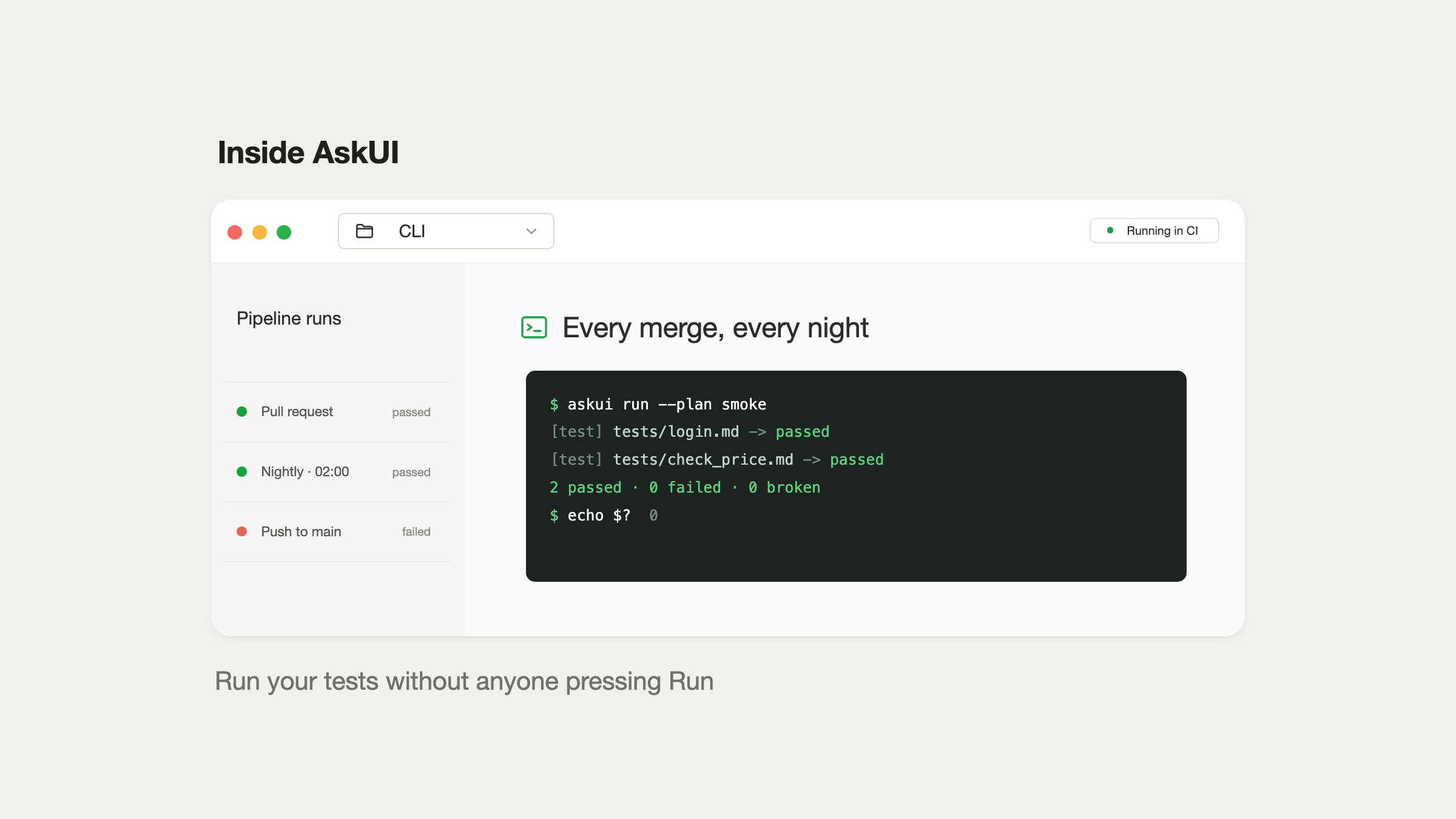
AskUI CLI removes that dependency. The same project you built and verified in AskUI Desktop runs from a terminal and from any CI pipeline, on every merge and every night, without anyone pressing a button.
The Test: A Web Shop Smoke Suite
For this example, we used a public demo web shop, saucedemo.com, and a test plan named smoke with two tests written in plain language: log in with the shop's public demo account, and check that a product shows the right price. We built and ran the suite in AskUI Desktop first, as testers commonly would.
We picked a web app to keep the example short. The same project setup and the same askui run work for desktop applications, Android, iOS and devices in your network, on your own runner.
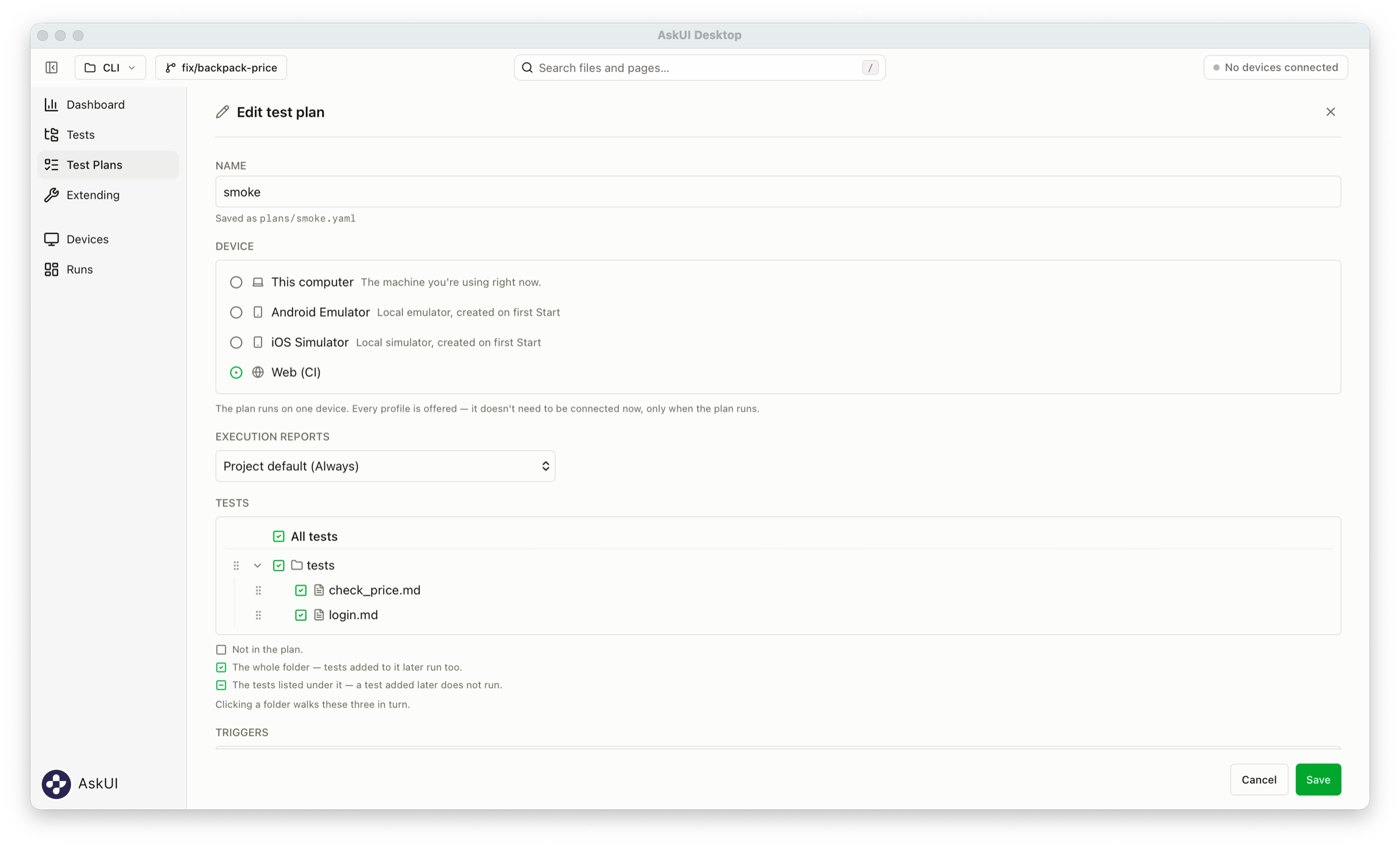
The smoke plan in AskUI Desktop, before it goes to CI.
Our goal: run exactly this suite on every pull request and every night, and let the pipeline tell us when something breaks.
Moving the Test to CI
What you need: an AskUI project that already runs in AskUI Desktop, a git repository for it on GitHub or GitLab, and an access token from your workspace in the AskUI Hub.
1. Same Project, No Rewrite
We did not convert anything. An AskUI project is a folder: tests, plans, device profiles and settings. We committed it to a git repository as AskUI Desktop saved it, and pushed it from the source-control flyout in AskUI Desktop, which shows what changed and suggests a commit message for you to review. A new project already comes with a .gitignore that keeps local run output out of the repository. Credentials live in the app's encrypted secret store, not in the project folder.
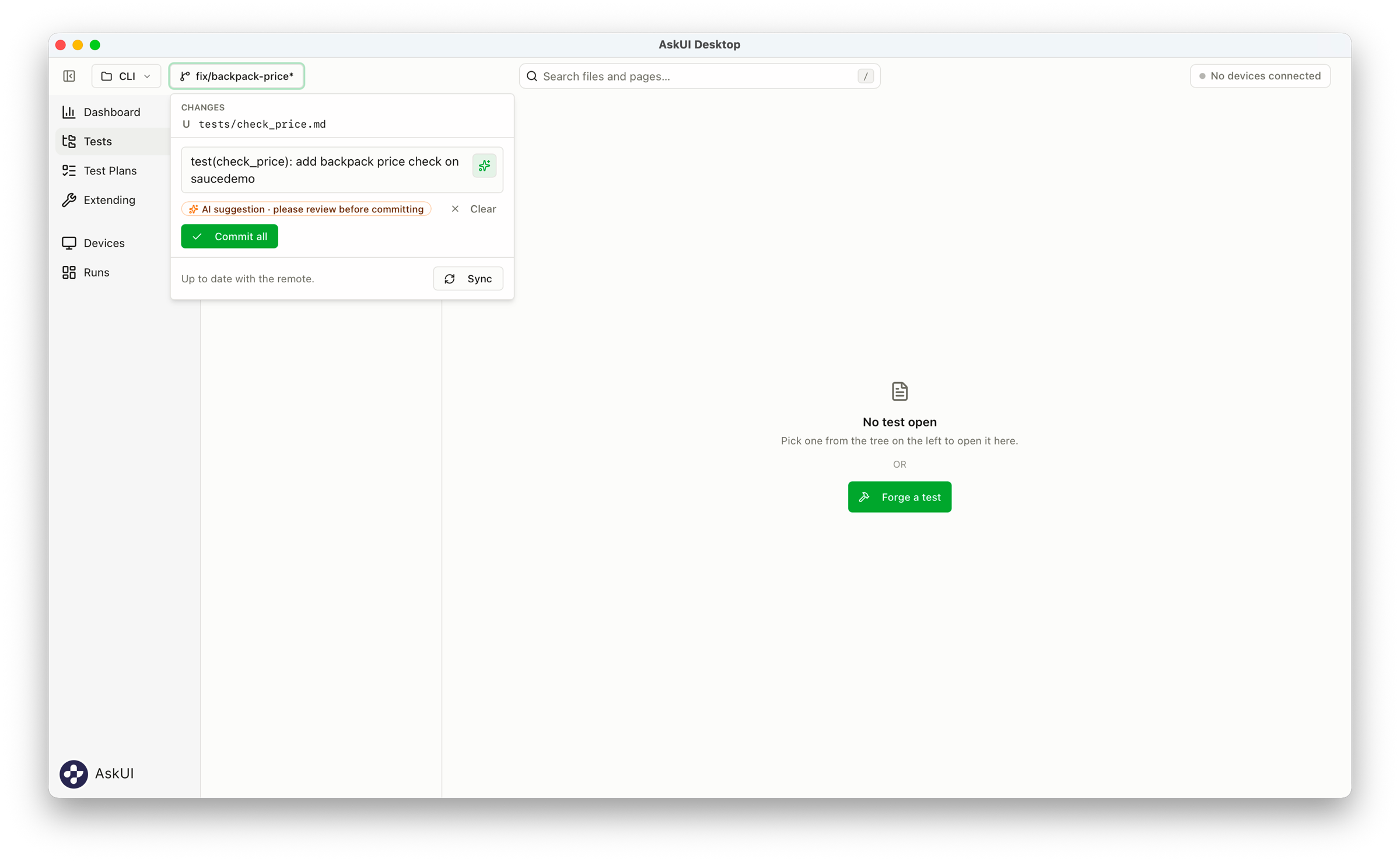
The AskUI project, committed and pushed from AskUI Desktop, with a suggested commit message.
This is the design decision behind the CLI: a run started from the CLI is the same run as one started in AskUI Desktop. Both hand the run to the same engine, with the same test plans, In-Flight Guidance, caching and verdicts. What you verified in the app is what runs in the pipeline.
2. Run It From the Terminal First
The CLI ships with AskUI Desktop, so there is nothing extra to install. On Windows, the installer puts askui on your PATH. On macOS, one click on Add to PATH in Settings → This machine → AskUI CLI does it.
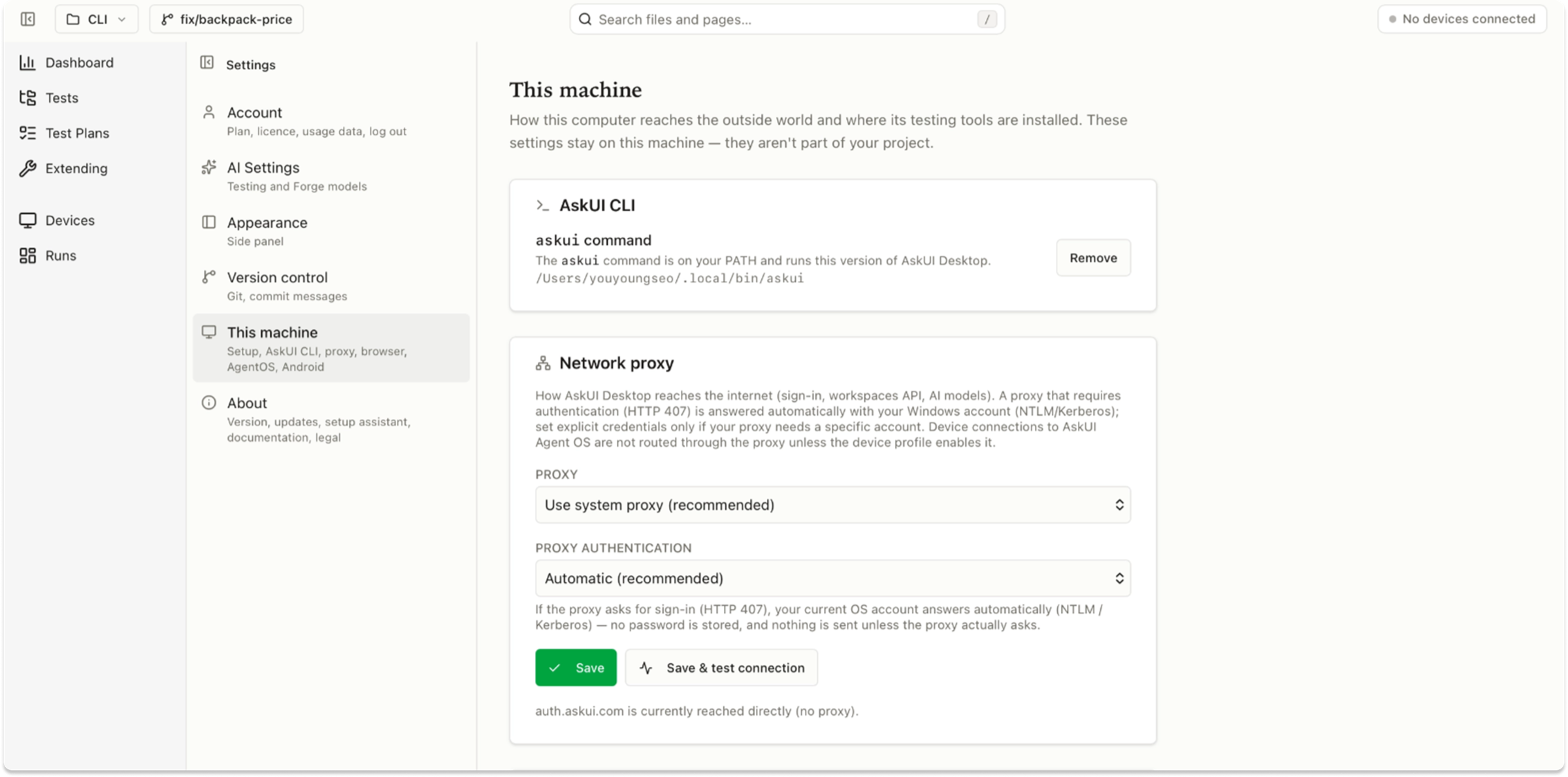
After one click, the askui command is on your PATH.
Then we signed in, checked the setup and ran the plan:
askui login
askui status
cd my-askui-project
askui run --plan smoke
askui login opens the browser and signs in with your existing AskUI account, just like AskUI Desktop. On a machine where no browser can open, such as one you only reach through a console, askui login switches to the device flow by itself: it shows a link and a code that you confirm on another device. To choose it yourself, for example over SSH, add --use-device-code. askui status shows which account, workspace and model the CLI will use. Run askui run from the project folder.

The smoke plan running from the terminal.
The run also appears in Runs in AskUI Desktop, with the same report as a run started in the app.
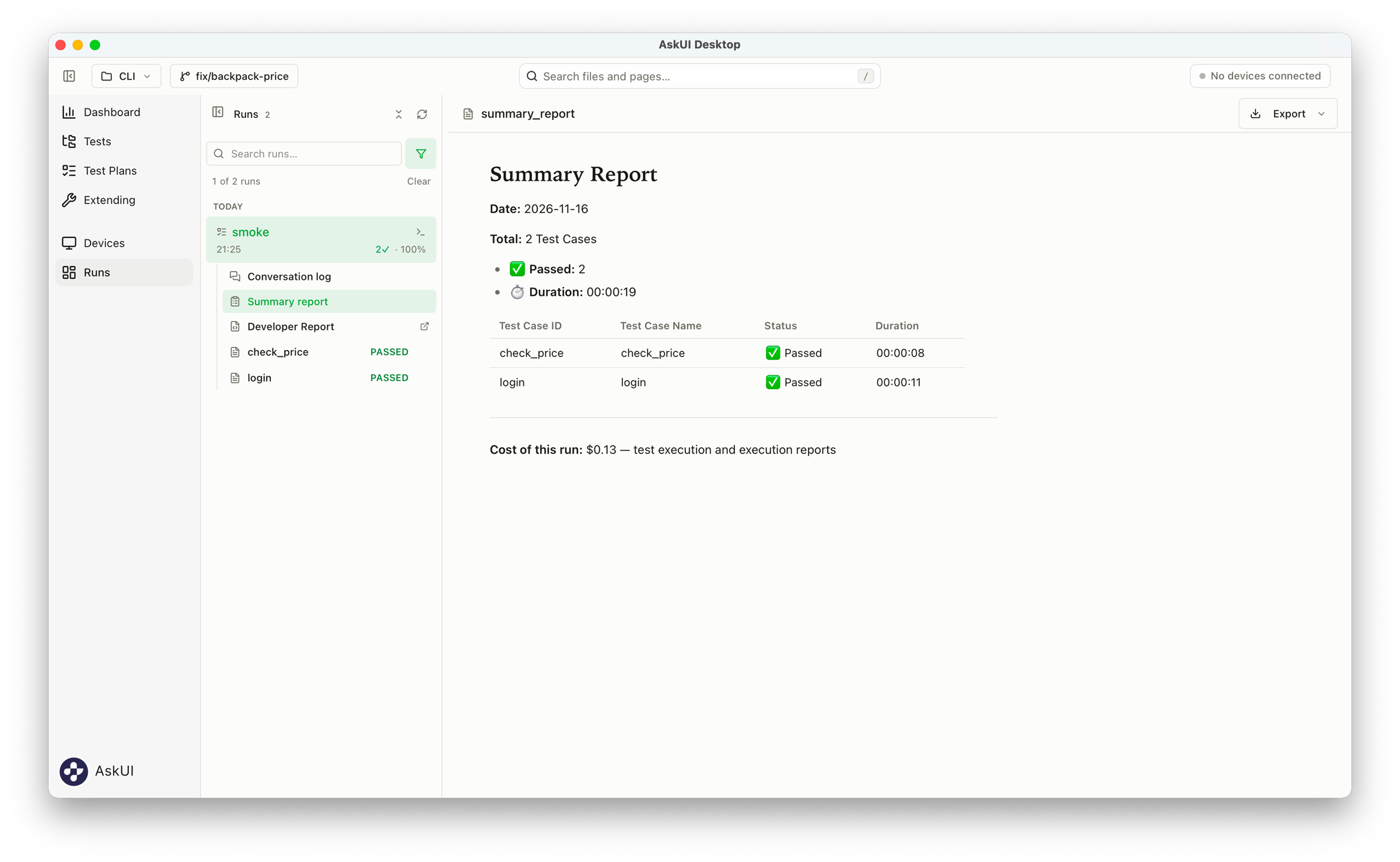
The run started from the CLI, listed in Runs in AskUI Desktop.
3. Choose Where Your Tests Run
Many teams keep their tests apart from the product code: the QA team owns the AskUI project, and the developers own the application. The CLI fits that setup. The product repository's pipeline checks out the QA team's repository and runs it with askui run --project, so UI regressions block a merge without anyone copying tests between repositories.
For desktop applications, Android, iOS and devices in your network, use your own runner: a machine with AskUI Desktop, registered with your CI system. Two settings keep it predictable:
- One run at a time on a shared test machine, so two pipeline runs never fight over the same screen.
ASKUI_IGNORE_APP_SETTINGS=1, so the run depends only on the pipeline, not on whatever someone set in AskUI Desktop on that machine.
If you reach a test machine only through a terminal, askui configure walks you through the model, the proxy and the workspace once. And when a run behaves differently on one machine, askui config list shows in one command which setting it used and where that value came from.
For our web demo, a runner hosted by GitHub is enough.
4. Hand It to the Pipeline
In CI, nobody signs in through a browser. The pipeline gives the CLI two values from its secret store: ASKUI_WORKSPACE_ID and ASKUI_TOKEN. The token is an access token you create in your workspace in the AskUI Hub. Secrets your project references, such as a tool's password, come from the same secret store under their own names. In GitHub, you add both values under Settings → Secrets and variables → Actions in your repository.
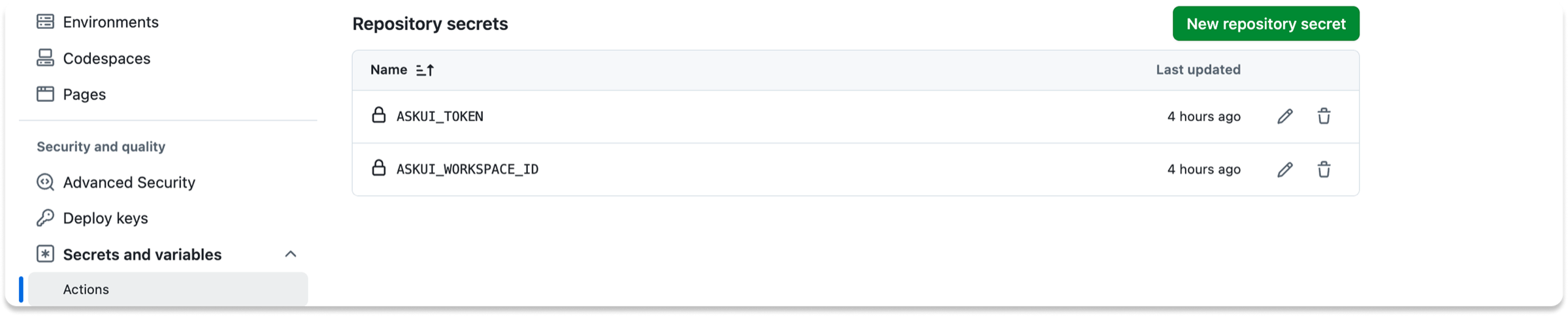
The two values the pipeline needs, stored as repository secrets. GitHub shows their names, never their values.
Here is the workflow we used on a macOS runner hosted by GitHub. It installs AskUI Desktop in the job, runs the plan on every pull request, every push to main and every weekday night, and publishes the results:
name: AskUI tests

on:
  pull_request:
  push:
    branches: [main]
  schedule:
    - cron: '0 2 * * 1-5' # every weekday night, 02:00 UTC
  workflow_dispatch:

jobs:
  askui:
    runs-on: macos-latest
    timeout-minutes: 30
    permissions:
      contents: read
      checks: write
    env:
      ASKUI_DESKTOP_VERSION: 0.11.0
      ASKUI_WORKSPACE_ID: ${{ secrets.ASKUI_WORKSPACE_ID }}
      ASKUI_TOKEN: ${{ secrets.ASKUI_TOKEN }}
      APP_URL: ${{ vars.APP_URL }}
    steps:
      - uses: actions/checkout@v7

      - name: Install AskUI Desktop (brings the askui CLI)
        run: |
          dmg="AskUI-Desktop-${ASKUI_DESKTOP_VERSION}-Installer-Mac-ARM64.dmg"
          curl -fsSL -o "$dmg" "https://files.askui.com/releases/AskUIDesktop/${ASKUI_DESKTOP_VERSION}/${dmg}"
          hdiutil attach "$dmg" -nobrowse -quiet -mountpoint /Volumes/AskUI
          cp -R "/Volumes/AskUI/AskUI Desktop.app" /Applications/
          hdiutil detach /Volumes/AskUI -quiet
          mkdir -p "$HOME/.local/bin"
          ln -sf "/Applications/AskUI Desktop.app/Contents/MacOS/askui" "$HOME/.local/bin/askui"
          echo "$HOME/.local/bin" >> "$GITHUB_PATH"

      - name: Run the smoke plan
        run: askui run --plan smoke --output run-artifacts --reporter html,md,junit

      - name: Upload the reports
        if: ${{ !cancelled() }}
        uses: actions/upload-artifact@v7
        with:
          name: askui-reports
          path: run-artifacts/

      - name: Publish the test results
        if: ${{ !cancelled() && hashFiles('run-artifacts/junit.xml') != '' }}
        uses: dorny/test-reporter@v3
        with:
          name: AskUI tests
          path: run-artifacts/junit.xml
          reporter: java-junit
You can copy it into .github/workflows/askui.yml. It expects the AskUI project at the root of the repository.
What the important lines do:
askui run --plan smokeruns the same plan you ran in the app. Use the name of your plan here.--reporter html,md,junitwrites the AskUI report for people and a JUnit file for the pipeline, from the same run.ASKUI_DESKTOP_VERSIONis the AskUI Desktop version the job installs. Every run uses that version until you change it.
APP_URL is the address of the application under test. Add it under the Variables tab, and set the start URL of your web browser profile to ${APP_URL}, so the pipeline decides which address the tests open. On a runner without a display, turn Headless on in that profile.
More workflow examples, including GitLab CI and your own runners, are in the AskUI in CI guide.
Running the Test
We opened a pull request, and the pipeline ran the smoke plan on its own. The same workflow also runs the suite every weekday night, so a regression from a merged change shows up the next morning, even without a new pull request.
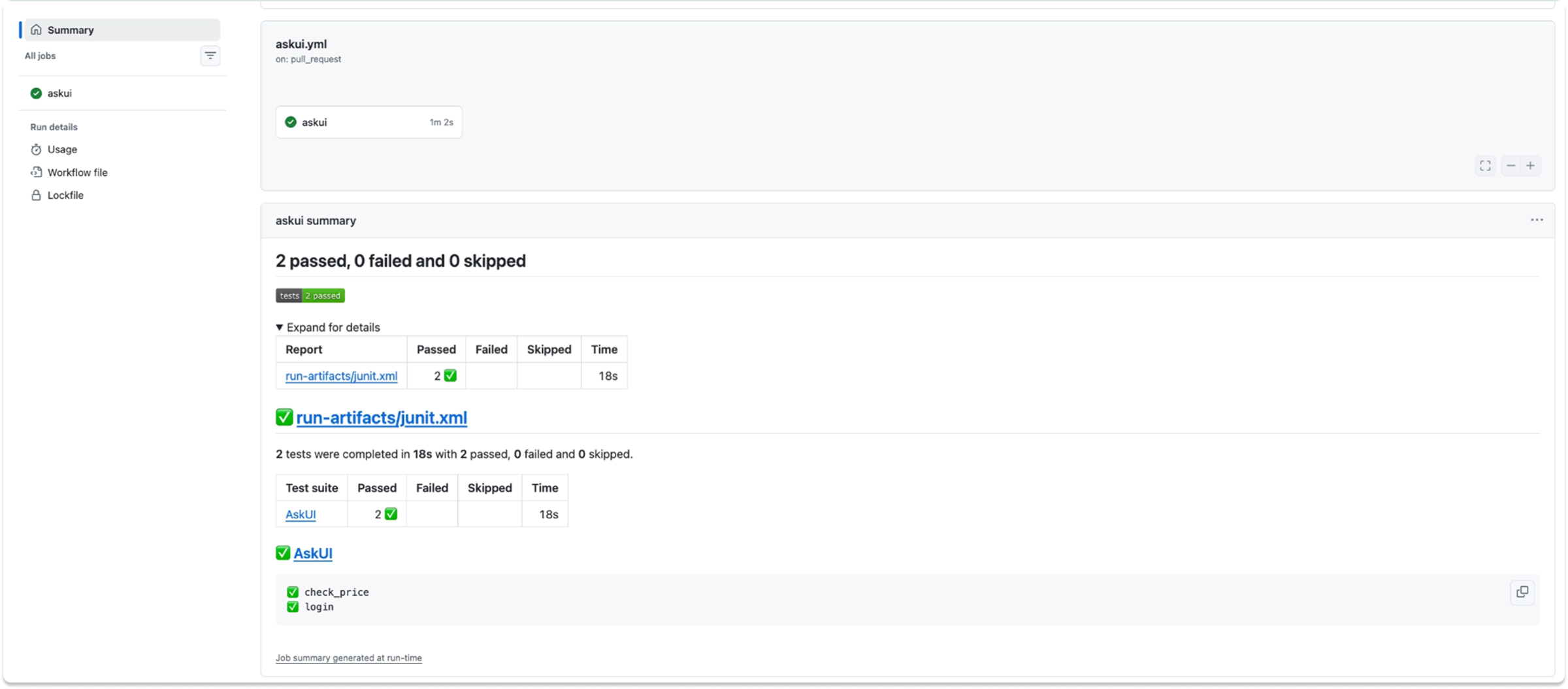
Each AskUI test shows up as its own result in the pipeline.
To see what a regression looks like, we changed the price test to expect the backpack at $19.99, while the shop shows $29.99. We pushed it, and the job turned red. The pipeline named the failing test and its reason, and the login test still showed as passed.
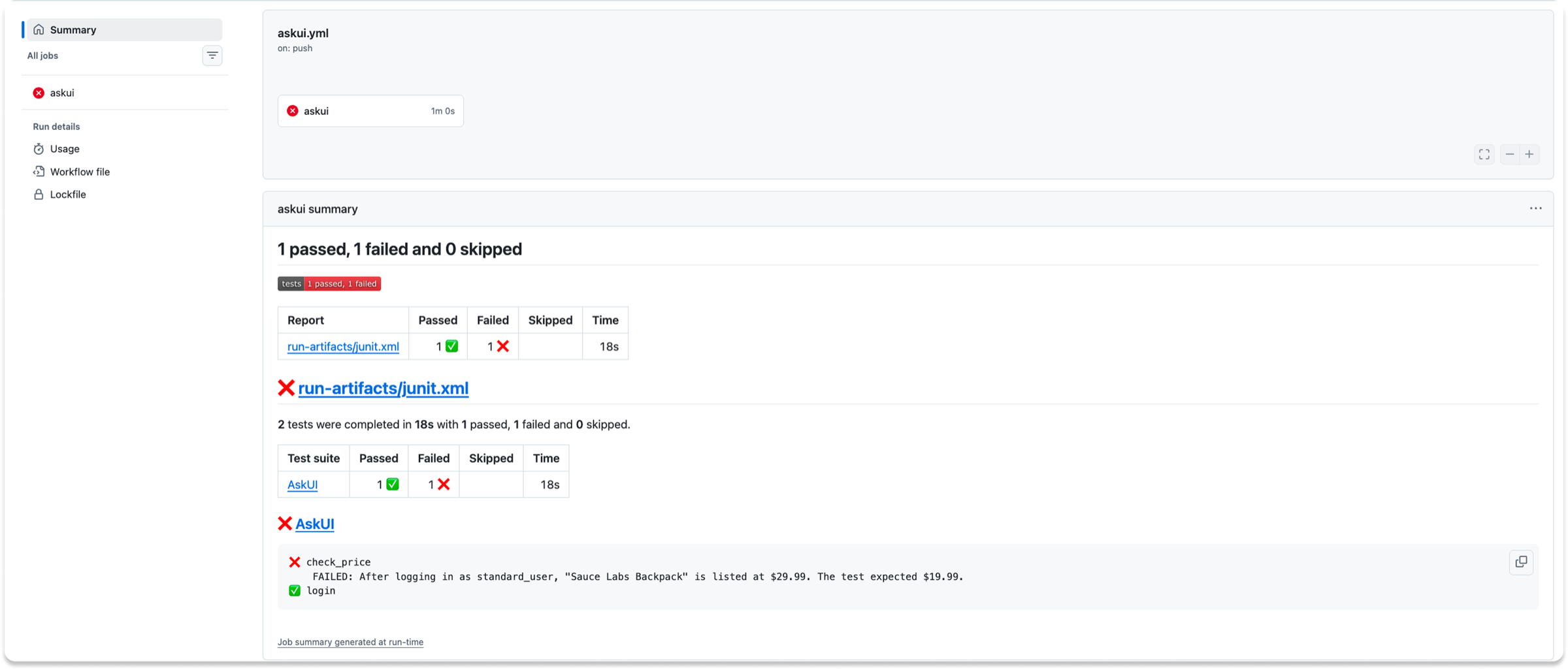
A failed test fails the job. In a pull request, the regression is caught before the change is merged.
The full AskUI report, with every step, screenshot and the agent's reasoning, was attached to the run as an artifact. Anyone on the team can open it and see what happened without rerunning anything.

The reports are attached to the pipeline run, ready to download.
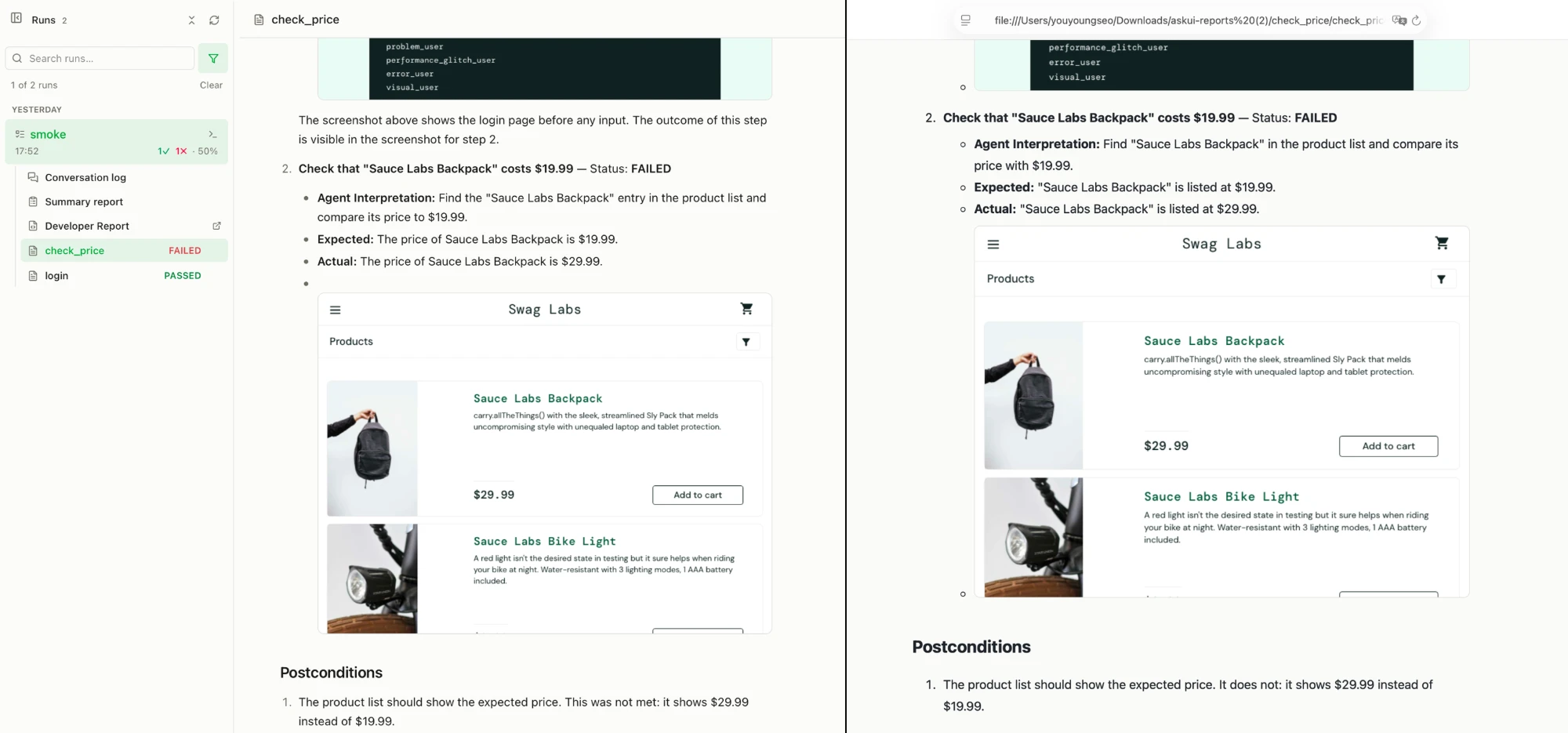
Left, the report from a run started in the terminal on a Mac. Right, the report from the GitHub Actions run. The format, the screenshot and the verdict match.
When the Pipeline Turns Red, You Know Who Acts
A red build should not mean "go find out what happened." It should tell you what to fix. A failed product, a misconfigured runner and a run where nothing happened need different people and different fixes. So the CLI reports each one with its own exit code, chosen by who needs to act:
| Exit code | What happened | Who acts |
|---|---|---|
| 0 | All tests passed | Nobody |
| 1 | A test failed or broke | The product team |
| 2 | The command line is wrong | The pipeline author |
| 3 | The environment or the project is wrong, for example missing credentials | The pipeline author |
| 4 | No test ran | The pipeline author |
| 130 | The run was cancelled | Whoever cancelled it |
Two of these are easy to overlook:
- Setup errors are caught before the first test. The CLI checks what a run needs before it starts. Missing credentials stop the run with a message that names the cause, instead of failing at the first test and sending the product team after a bug that does not exist.
- No false passes. A plan that matched no tests, or a run that produced no verdict, fails the job. A pipeline never shows green for a run that tested nothing.
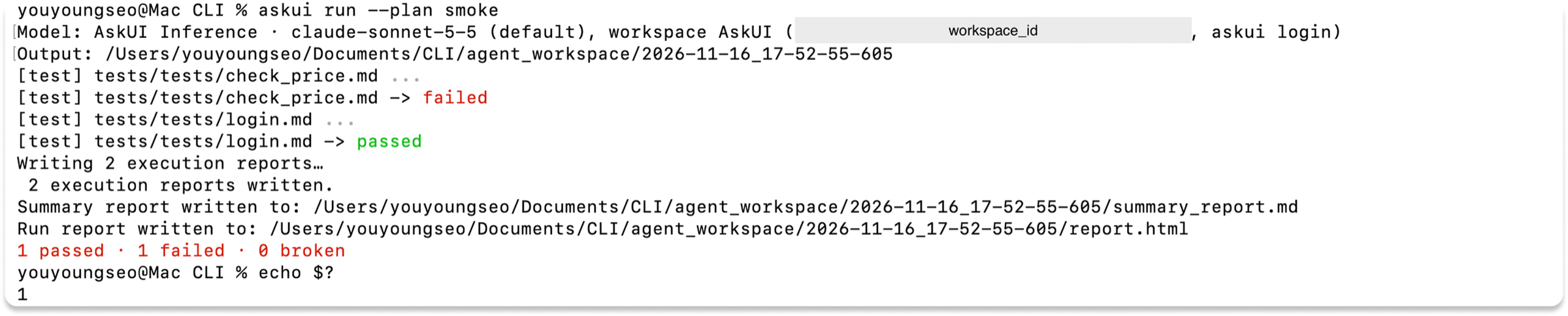
A failed test ends the run with exit code 1. That is what turns the pipeline red.
What This Means for QA Teams
Testers spend less time running regression tests and more time deciding what to test. The suite you built in AskUI Desktop keeps working for you when you are not at your desk: every night and on every merge. A long run on your own test machine does not fail halfway because a sign-in expired. When something fails, the pipeline has already said whether it is the product, the setup, or a run that did not happen.
What This Means for Your Organization
As long as tests run from one person's desktop, they are one person's task. In CI, the suite runs on a schedule, no matter who is on vacation. Regressions show up early, before merge, where developers already look. QA and development can keep their own repositories and still see the same result in the same pipeline. Every run leaves its verdict and report in your CI history.
Build and verify your tests in AskUI Desktop, then let AskUI CLI run them as part of your release process.
FAQ
Do I need to rewrite my tests for CI?
No. The CLI runs the AskUI project you built in AskUI Desktop, unchanged. Commit it with git, and the pipeline runs the same plans you run in the app.
Which CI systems does it work with?
Any CI system that can run a command. askui run gates the job through its exit code and writes JUnit XML, which GitHub Actions and GitLab CI display per test. The docs include workflow examples for both. There is no AskUI-specific plugin to install.
Where do credentials and secrets go?
In your CI system's secret store. The pipeline passes ASKUI_WORKSPACE_ID, ASKUI_TOKEN and your project's secrets to the run as environment variables. Nothing sensitive is committed to the repository.
How do I install the CLI on a runner?
Today the CLI ships with AskUI Desktop, on Windows and macOS. A job can install AskUI Desktop on a hosted runner, as in the example above, or you install it once on your own runner. A standalone download, including Linux runners, is planned.
Does it work for desktop and mobile apps, not just web?
Yes. The demo uses a web shop to keep it short. For desktop applications, Android, iOS and devices in your network, run the same project with askui run on your own runner, a machine with AskUI Desktop registered with your CI system.
Can I use my own model in CI?
Yes, with a license for your own model. Flags such as --model-provider and --model-id point a run at it, and the pipeline sets them on every run without storing them anywhere.