

TLDR
Visual regression testing is one form of baseline testing, the broader practice of comparing current results against a stored reference to catch unintended change. Here, the reference is a screenshot: capture it, compare new screenshots against it, and flag anything that changed. The concept is simple. The implementation isn't: dynamic content needs masking, anti-aliasing creates false positives, and every baseline eventually goes stale and needs recapturing. This is what the process actually looks like in a working CI/CD pipeline, and where it tends to break down at scale.
Introduction
If you already know what visual regression testing is and how it compares to functional UI testing, this breakdown covers that ground. This post is about what happens once you actually wire it into a pipeline: the steps, the noise sources, and the maintenance work nobody mentions in the intro tutorials.
The Process, Step by Step
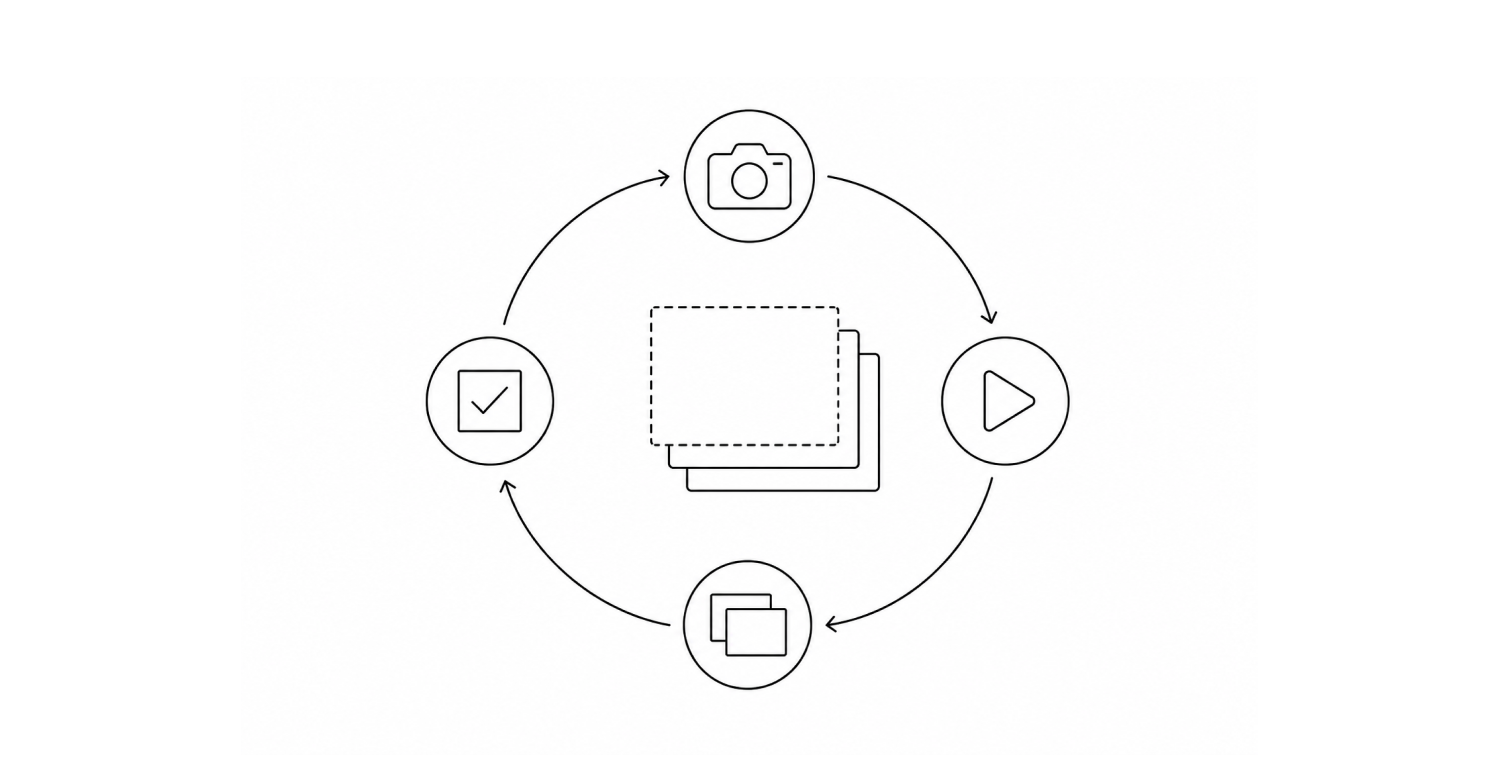
1. Baseline Capture
The first run establishes the reference point: a screenshot of the page in its current, approved state. Everything after this is measured against it. Get the baseline wrong, capture it mid-animation, on a slow-loading page, or with stale test data, and every comparison after it inherits that error.
2. Test Execution and Screenshot Capture
Automated tests navigate the application the way a user would, and a screenshot gets captured at each defined checkpoint. Viewport size, browser, and device all affect the render, so most setups capture the same checkpoint across multiple configurations rather than once.
3. Image Comparison
The new screenshot gets compared against the baseline, usually pixel by pixel, sometimes with AI-assisted comparison that tries to distinguish a meaningful layout shift from a rendering artifact. This step is where most of the false positives get generated or filtered out, depending on how well it's tuned.
4. Analysis and Reporting
Differences get surfaced in a visual diff report so someone can decide whether a flagged change is a real regression or an intentional update. This visual regression analysis step is where the judgment call actually happens, an automated tool can flag a pixel difference, but deciding whether it's a bug or a deliberate design change still takes a human look. If it's intentional, the baseline gets updated. If it's not, it's a bug.
What Actually Causes the Noise
The four steps above sound clean. In practice, most of the maintenance burden comes from a handful of recurring problems:
- Dynamic content. Timestamps, ad slots, live counters, and rotating banners change on every page load whether the UI actually changed or not. These need to be explicitly masked or excluded, or every run generates false positives.
- Anti-aliasing and font rendering. The same page can render with slightly different pixel edges across browsers, OS versions, or even GPU drivers, none of which reflect an actual bug. Tools with AI-assisted comparison exist specifically to filter this out. Pure pixel-diffing tools tend to flag it constantly.
- Animation and load timing. A screenshot taken mid-transition looks broken even when the page is fine. Comparisons need to wait for the UI to settle, which is harder to get right than it sounds on pages with staggered loading.
- Baseline drift. Every legitimate design change, a new feature, a rebrand, a responsive breakpoint fix, invalidates part of the baseline. Someone has to review the diff and approve the new baseline, and on an active codebase that review queue can grow faster than the team can clear it.
Where the Process Itself Becomes the Bottleneck
Baseline maintenance is the recurring cost in visual regression testing, and it compounds. Every legitimate UI change adds another baseline that needs review and approval, on top of the ones already in the queue. This is the same dynamic behind a pattern seen across rule-based automation more broadly: coverage climbs quickly at first, then plateaus around 40-60% and stays there, because the review and update work grows in step with the UI instead of shrinking over time.
It's not a bug in any particular tool. It's a property of the approach: a fixed reference image only stays useful as long as the UI doesn't change, and UIs change constantly. Agentic testing works from a different mechanism, reasoning about the interface at runtime instead of diffing it against a stored image, which removes the baseline-review step entirely. That's a different tradeoff, not a strict upgrade, and it's worth understanding both before picking one.
Conclusion
Visual regression testing is straightforward in concept and genuinely useful for catching layout and rendering bugs that functional tests miss. The real work is in the implementation: masking what shouldn't be compared, filtering rendering noise from real regressions, and keeping baselines current as the UI legitimately evolves. Budget for that maintenance work upfront, it's the part that determines whether the process holds up at scale or turns into a diff queue nobody has time to clear.
FAQ
What is the primary goal of visual regression testing?
To catch unintended visual changes in a web application by comparing screenshots against a baseline, so layout, font, and rendering issues get flagged before users see them.
How does visual regression testing differ from functional testing?
Functional testing verifies that features work, a button click submits a form. Visual regression testing verifies that the interface renders correctly, layout, colors, fonts, and alignment. Here's the full comparison.
What causes false positives in visual regression testing?
Mostly dynamic content that changes on every load (timestamps, ads, live data), anti-aliasing differences across browsers or devices, and screenshots captured before an animation or transition has settled. Masking dynamic regions and using AI-assisted comparison instead of pure pixel-diffing cuts down on most of it.
How often do baselines need to be updated?
Whenever a legitimate UI change ships, a redesign, a new feature, a responsive fix. There's no fixed schedule. On an actively developed product, this can mean reviewing and approving baseline updates every release, which is the main ongoing cost of running visual regression testing at scale.
Can visual regression testing be integrated into a CI/CD pipeline?
Yes. Most visual regression tools plug into existing test frameworks (Cypress, Playwright, Selenium) and run as part of the same pipeline, capturing and comparing screenshots on every commit or pull request rather than as a separate manual step.
Is there a way to reduce the baseline maintenance overhead?
Within a screenshot-comparison approach, not really. The baseline is the mechanism, so the only lever is tightening masking and the review process. Agentic testing runs on different infrastructure entirely, reasoning about the interface at runtime instead of comparing it to a stored image. That matters most for testing beyond the browser, such as HMI, embedded, or regulated environments, where the tradeoffs look different from a standard web pipeline.